My vibe-coded full-stack web app on the cloud
Eventually Organized is a family-focused planning assistant that takes the endless stream of long emails landing in my inbox (from school, from clubs, from a dozen other places) and turns them into short, actionable summaries I can actually use.
That's the one-line pitch. Here's the longer story of why I built it, and how.
What was I trying to achieve?
A couple of things, really.
First, I wanted to see what this whole "vibe coding" thing was actually about. Not by following along with a toy tutorial, but by setting myself a real bar: build a production-grade application, end to end. A solid cloud-based backend foundation, a frontend that's genuinely nice to use, and proper authentication holding it all together. If I was going to learn, I wanted to learn on something that couldn't get away with cutting corners.
Second, and honestly this part came first in my head, I've always wanted a productivity app built just for me. Not a one-size-fits-all tool where I bend my workflow to fit someone else's idea of how I should work, but something shaped around exactly how my brain handles a busy week. This was my chance to build it.
And yes, before anyone says it: all of this could have been done a hundred other ways. There are off-the-shelf apps, there are no-code tools, there are simpler paths. But this was my way: to learn something new and to build something that fits me like a glove. That was the whole point.
What does it do?
Three things, mostly, and they all work together.
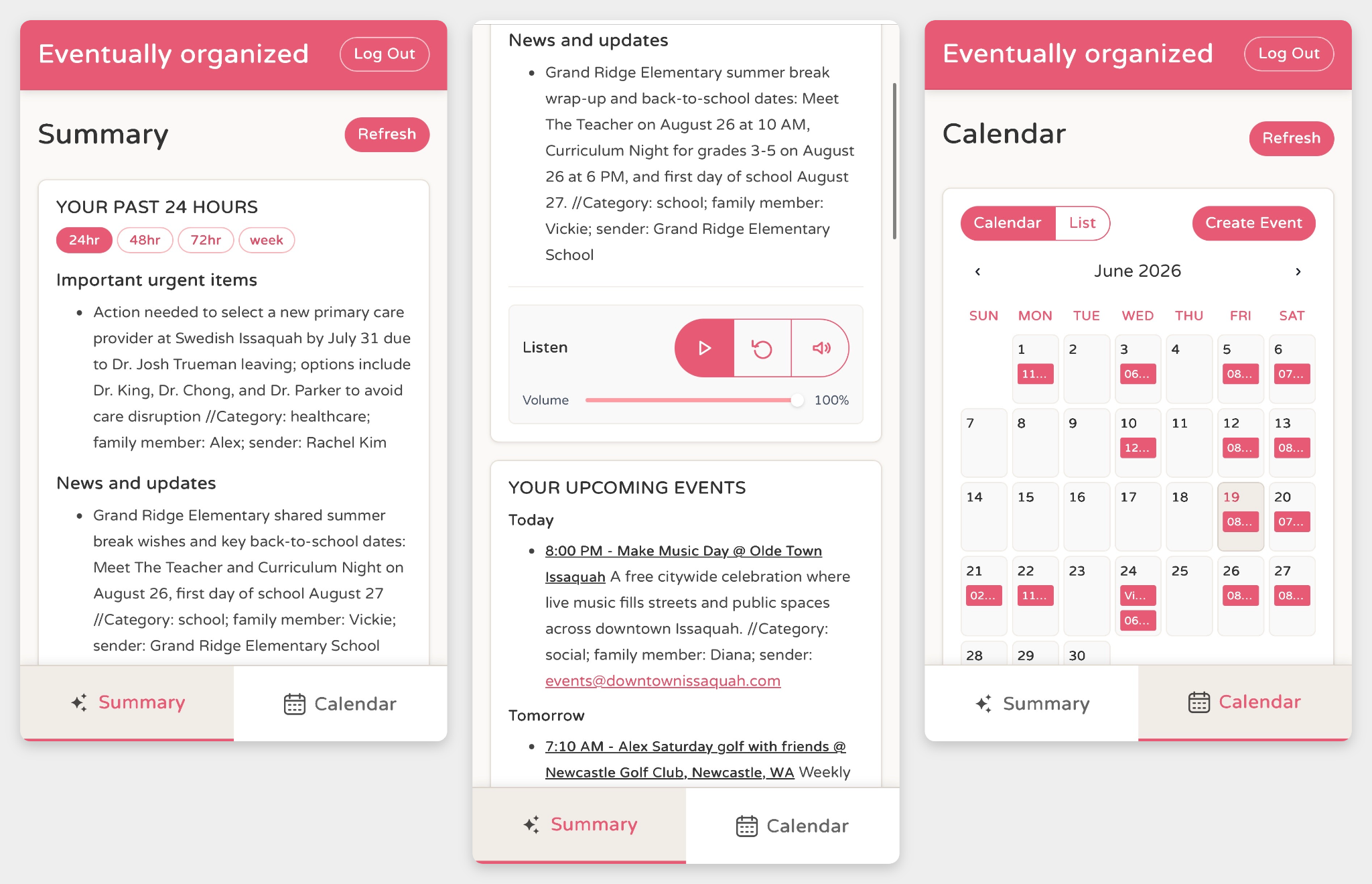
It watches my email. When something new arrives, it reads it, pulls out the important information, summarizes it, and figures out whether there are any actions buried in there or calendar events I need to know about. Then it classifies everything and tucks the data away so nothing gets lost.
It gives me the rundown. I can open it up and see a summary of everything from the last 24 hours, or any timeframe I pick, with the most important and most urgent things pushed right to the top. And because mornings are chaos in my house, it'll also read that same summary out loud to me, almost like a little morning news broadcast, so I can stay hands-free while I'm getting everyone out the door.
It keeps track of the calendar. Actions and upcoming events show up both as a running list and in a proper calendar view, and I can add, edit, or delete events right there. It's the part that turns "I'm aware of things" into "I've actually got things handled."
Tech Stack
Now for the part you came for. Here's what's under the hood.
Core User Flows
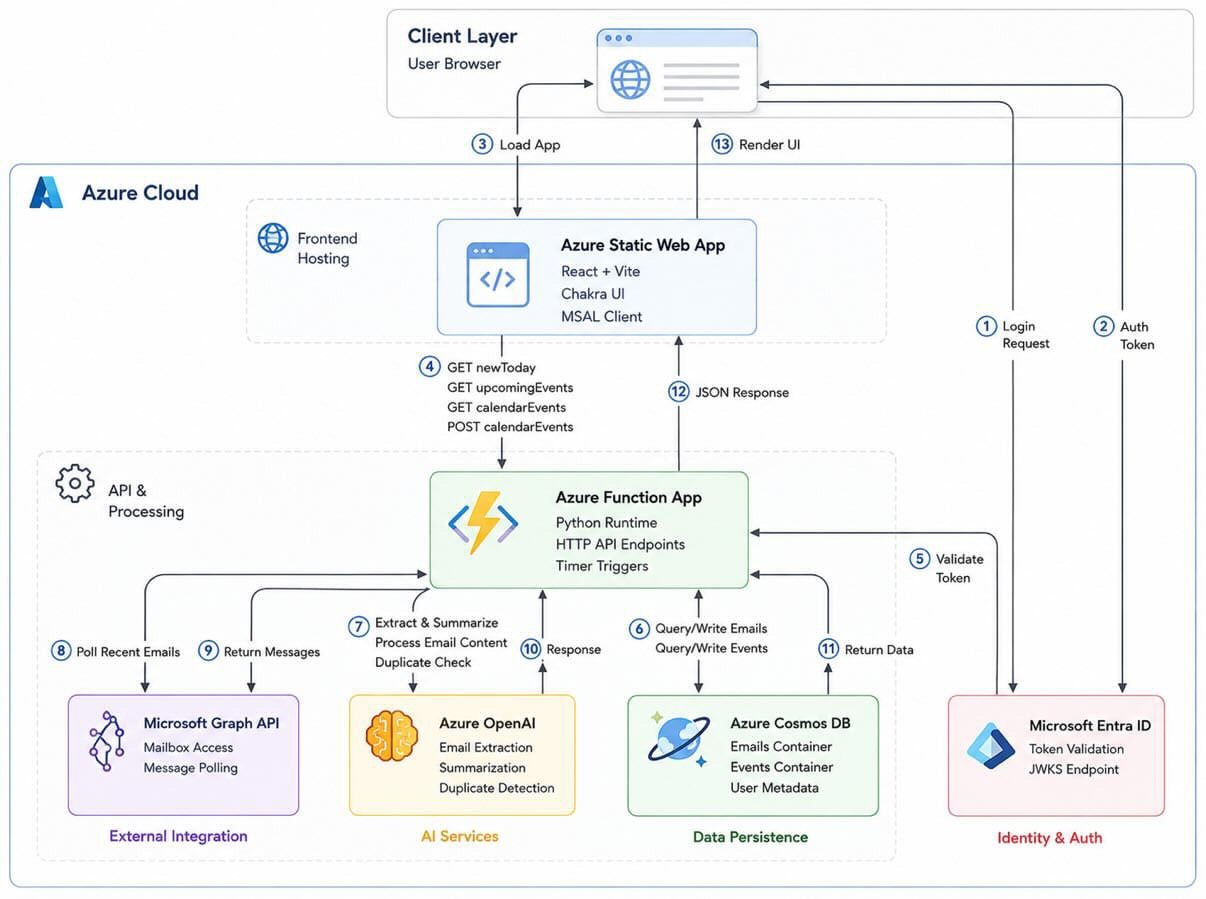
At a high level, the app works like this:
- The user signs in on the web app.
- The frontend calls secured backend APIs.
- The backend validates the token, applies its request guards, and reads from or writes to Cosmos DB.
- Azure OpenAI does the heavy lifting: extraction, summarization, and duplicate checks.
- The UI shows the summaries and calendar events.
Nothing exotic, just a clean path from sign-in to summary, with security checks at every handoff.
Frontend
- React + Vite
- Chakra UI
- MSAL Browser for Microsoft sign-in
Backend
- Azure Functions (Python)
- Azure OpenAI
- Azure Cosmos DB
- Microsoft Graph (optional timer-based email polling)
Hosting and Identity
- Azure Static Web Apps (frontend)
- Azure Function App (backend APIs)
- Microsoft Entra ID / Azure AD (authentication)
This Is What I Learnt
Here's the biggest takeaway, and it surprised me: you cannot just throw ideas at the tool and expect it to hand you a finished app. I tried exactly that. It did not work.
So I went back to basics and followed the same software development process I'd use for any serious project:
- First, I wrote down my requirements.
- Then I figured out the architecture: the building blocks and components, how and at what point they interact, and the way data flows between them.
- After that, I implemented the parts one by one and connected them together.
- Then I applied security principles and did a proper clean-up.
- And finally, I tested everything and fixed the bugs.
When I look back at it, what I was really doing was working with the AI the same way I'd normally work with a whole team. First it played the part of Business, then the architect, then UX, then the engineers, and finally QA. The flow was practically identical to a real project. And honestly, my background in tech and UX, plus my cloud knowledge, helped tremendously. The AI was a brilliant partner, but it still needed someone who knew what good looked like to steer it.

Post a comment